
Fotolia
Choosing the best OS: Linux server vs. Windows Server
When determining the best server OS for a data center, you have Windows Server and multiple Linux options. For both, you'll want to look at vendor support, cost and functionality.

Windows and Linux-based servers work side by side in the corporate data center. But which is the best server OS for your changing workloads? For an effective evaluation of a Linux server vs. a Windows Server, you must look at their functionality, hardware requirements, stability, cloud readiness, security, cost and support options.
You must also consider workload: Do you need a cloud-ready OS or does the application have specific hardware requirements? Windows isn't going away any time soon, particularly as a corporate authentication and authorization offering. But as applications move more toward cloud architectures, Windows servers are making way for Linux.
Historically, organizations have deployed Linux servers for the tasks Linux does well, such as database management, web server management and customer relationship management. Microsoft, on the other hand, markets Windows Server as an all-in-one OS that's easy to manage and requires less training to use. But Linux also works well as a multipurpose OS, so it's important to know which OS best fits your server needs.
Best server OS stability
Linux has a reputation for stability that Windows Server does not, but this is an outdated point. Faulty hardware drivers can cripple both Windows and Linux OSes. Don't choose a server OS based on outdated notions of stability; Windows and Linux are at the same stability level when it comes to server deployments.
OSes such as Windows NT Server and Windows 2000 Server had stability issues with graphics drivers and Internet Information Services. However, Windows Server is a more mature OS.
You can attribute some of this stability to Microsoft's gradual security improvements and features in each new version, such as failover clustering. Microsoft also performs rigorous hardware testing and has a logo certification program for compatibility guarantees with server hardware.
Cloud readiness
Both Linux and Windows Server support cloud-based computing. For Linux, you can use the OpenStack cloud framework. In 2017, over 1,300 users supported OpenStack, and those that implemented it ran 60-80% of their infrastructure on OpenStack, according to the organization.
Microsoft markets Windows Server as a cloud OS. Microsoft Azure runs on top of Windows Server and Hyper-V. Microsoft's software as a service offering, Office 365, also runs on Windows Server and Hyper-V.
Many third-party cloud service providers, such as Amazon, Rackspace and Google, allow customers to create virtualized Windows Server instances in the cloud.
Cost of ownership in the data center
Linux is technically a free OS. Most free distributions, however, offer no guarantee of uniformity or consistent performance. To select the best server OS for enterprise-level deployments, you should ignore the myth that Linux is free and Windows is not.
With Linux, you pay for support. This is why the most widely adopted Linux server OSes come from vendors such as Red Hat, Suse and Ubuntu, which charge for support contracts and provide constant maintenance.
When it comes to a Linux server vs. a Windows Server, Linux is less expensive because of its pricing structure. There's no such thing as per-user licensing of Linux distributions, so the potential cost savings of migrating servers from Windows to Linux is significant.
This cost discrepancy is because, with Windows, you have to purchase server OS licenses and client access licenses. Microsoft, however, allows its customers to operate Windows Server in the Azure cloud for a fraction of the cost of a license.
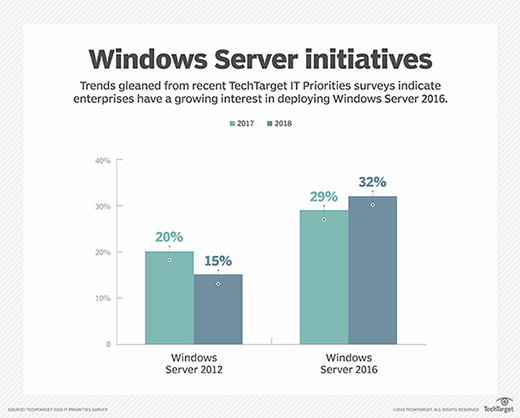
Licensing is no longer a major consideration for organizations that deploy a large number of virtualized Windows servers as long as the Hyper-V hosts have the proper licenses. The 2016 version of Windows Server Datacenter edition with Hyper-V virtualization can run an unlimited number of Windows Server virtual machines (VMs).
IT security: Linux server vs. Windows Server
The documentation that denotes the structure of an open source OS such as Linux is public information, which some people consider a disadvantage for security. The fact that interested parties can access different aspects of the OS, however, also makes it easier to detect and fix bugs. In a proprietary OS such as Windows Server, you can observe a bug, but then support technicians must fix the issue.
The Linux open source code also provides modularity as a security benefit. You can run tasks across multiple OSes and increase data center security instead of running many services on a multipurpose server. If one virus attacks one task, you don't lose all server functionality and can quickly bring the corrupted task back online.
Linux also uses mandatory access control systems, such as Security-Enhanced Linux (SELinux), to reduce vulnerabilities and block all unneeded system calls. There is no equivalent to SELinux for Windows Server.
Microsoft routinely releases security patches for the Windows Server OS as it discovers new vulnerabilities. It also provides extensive documentation on how to use built-in Windows Server security controls, as well as tips for establishing network architecture to achieve a robust server OS security framework.
Each new version of Windows Server introduces features intended to strengthen OS security. Windows Server 2016 introduced the shielded VM feature for Hyper-V, which protects Hyper-V VMs against users who have physical host access.
Windows Server is the best server OS for corporate authentication capabilities. Active Directory is a full authentication and authorization platform that integrates applications, users and computers. Linux distribution alternatives to Active Directory don't have the same hardware and application support.
Data center hardware needs
Linux doesn't require as much hardware as Windows. You can run a decent Linux server with 256 MB of RAM and a disk with just a couple of gigabytes, but that's not the typical workload in a corporate data center.
There's less OS overhead for a Linux server vs. a Windows Server for large database systems. The Linux kernel is highly customizable, and you can make it even more efficient with update scheduling, recompilation and user space settings.
The hardware requirements for Windows Server 2016 vary depending on the server's workload, but Windows Server can run on a system with 512 MB of RAM, 1.4 of GHz -- 64-bit -- CPU and a minimum of 32 GB of disk space.
Interoperability and vendor support
It's a common belief that Windows offers more vendor support than Linux systems, but this is rapidly changing. As applications move to the cloud, some organizations are keeping larger applications, such as Oracle and SAP, in-house. Both Windows and Linux OSes support these applications.
From the hardware side, servers must have the proper drivers in order to run any Linux distribution because Linux is not entirely hardware-agnostic. You should work with service providers such as Red Hat and Canonical to ensure your hardware is compatible with Linux.
All major vendors offer servers that support Windows Server; certain ones may provide servers preloaded with Linux as well, but Microsoft has the market share for compatible hardware.