real-time operating system (RTOS)

What is a real-time operating system (RTOS)?
A real-time operating system (RTOS) is an OS that guarantees real-time applications a certain capability within a specified deadline. RTOSes are designed for critical systems and for devices like microcontrollers that are timing-specific. RTOS processing time requirements are measured in milliseconds. Any delays in responding could have disastrous consequences.
Real-time operating systems have similar functions as general-purpose OSes (GPOSes), like Linux, Microsoft Windows or macOS, but are designed so that a scheduler in the OS can meet specific deadlines for different tasks.
RTOSes also commonly appear in embedded systems, which are a combination of hardware and software designed for a specific function and may also operate within a larger system. Often, embedded systems are used in real-time environments and use a real-time operating system to communicate with the hardware.
RTOSes are designed to handle multiple processes at one time, ensuring that these processes respond to events within a predictable time limit. Processing in an RTOS occurs within defined time constraints and monitors the priority of tasks. An RTOS is also able to make changes to task priority. Systems that are event-driven often switch between tasks based on priority.
Some real-time operating systems are created for special applications, while others are more general purpose. Usually, RTOSes provide the following functionality:
- multitasking, where tasks are rapidly switched between to give the impression that multiple programs are executing concurrently;
- process thread prioritization; and
- a sufficient number of interrupt levels.
RTOSes are included in the following devices:
- air traffic control systems;
- anti-lock brakes and air bags;
- cameras;
- medical systems; and
- PCs.
Characteristics of a real-time operating system
Real-time operating systems generally have the following characteristics:
- Small footprint. Compared to general OSes, real-time operating systems are lightweight.
- High performance. RTOSes are typically fast and responsive.
- Determinism. Repeating inputs end in the same output.
- Safety and security. Safety-critical and security standards are typically the highest priority, as RTOSes are frequently used in critical systems.
- Priority-based scheduling. Tasks that are assigned a high priority are executed first followed by lower-priority jobs.
- Timing information. RTOSes are responsible for timing and providing application programming interface
How does an RTOS work?
RTOSes are subdivided into soft and hard real-time systems. A soft RTOS is designed to operate within a few hundred milliseconds, while a hard RTOS is designed to provide predictable response times within tens of milliseconds.
Soft real-time systems typically have larger file sizes compared to hard RTOSes. Some executions act less predictably during peak load but are tolerated, as computations are rolled back to previously established checkpoints if an error occurs. Soft RTOSes are normally used in systems where time-based executions are less important, such as in PCs, cameras and smartphones.
Hard RTOSes typically have small or medium-sized data files. They act predictably during moments of peak loads, and computation is rolled back if an error occurs. Hard RTOSes are normally used in systems that require important time-based executions, such as in airplane sensors, autopilot systems or medical devices.
In hard real-time OSes, if the calculation cannot be performed to make an object available at the designated time, the OS terminates with a failure. In a soft RTOS, the OS continues to function, but certain tasks may be unproductive if they fail to execute at a given time.
RTOSes also act as a scheduler, in which tasks can be scheduled as ready to run, running or blocked.
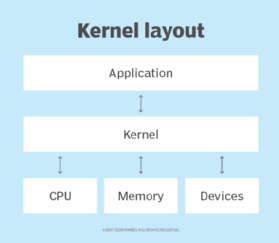
They typically have a monolithic kernel and microkernel architecture. The OS kernel is the core of an OS, which provides basic services for all other parts of the OS. Kernels are the main layer between the OS and hardware.
Monolithic RTOS kernel and operation processes share one space. This architecture operates quickly when compared to microkernel configurations and typically provides better performance. Even though monolithic RTOSes run faster, they are harder to perform updates on, and a programming error in the file system, protocol stack or driver can cause system crashes.
The microkernel architecture houses the kernel and operations in separate locations. This architecture is slower than monolithic RTOS, as any action must return to the kernel before it can move to the component it references. The microkernel also lacks file systems.
RTOS vs. GPOS
General-purpose OSes, like Windows or Unix, can handle multiple tasks concurrently but are not ideal for important, time-sensitive applications due to latency and synchronization issues. GPOSes can also operate without time constraints, so tasks may sometimes fail or take longer to execute. In other words, they provide a potential nondeterministic, soft real-time response to tasks.
RTOSes typically provide a deterministic, hard real-time response with the goal of providing a quick reaction to events. While GPOSes are good for general consumer use, RTOSes are designed for instances where a system needs to respond to an event or task within a short, designated time frame. RTOSes need to be quick and accurate for the typically embedded systems they reside in.
Popular RTOS software and factors for choosing an OS
Popular open source and commercial RTOS software products include the following:
- FreeRTOS from Amazon Web Services. This open source microcontroller OS is designed to simplify the development, security, deployment and maintenance of microcontroller edge devices.
- QNX Neutrino from BlackBerry. This commercial real-time operating system is similar to Unix and is designed to work in embedded systems. This is also one of the first commercially successful microkernel OSes.
- VxWorks from Wind River. This RTOS supports application deployment in containers. Mars Exploration Rovers run VxWorks.
- SafeRTOS from Wittenstein. This pre-certified safety real-time operating system is designed for embedded processors.
When looking for an RTOS, the following factors should be considered:
- Responsiveness. Factors that determine responsiveness include the scheduling algorithm, interrupt latency and context switch times.
- Safety certifications. Pre-certified and certified RTOSes ensure the quality of the RTOS meets industry design standards.
- Available system resources. The architecture defines the type of system resources needed. For example, microkernels use a small amount of system resources.
- Security. There are free, open source RTOSes available, as well as commercial options. Both provide built-in security features, but some offerings are more extensive.
- Compatibility for newer versions. Long-term use should also be factored in. The potential for future support and updates should be considered if an organization is going to use the RTOS for an extended period of time.
Learn more about RTOSes and how they work in internet of things (IoT) edge computing.