3 key problems computational storage devices can solve
This emerging technology brings stored data closer to compute processes, solving latency and performance issues. Discover the three potential advantages of computational storage.
Computational storage is a simple and potentially profound storage development. The basic concept behind computational storage devices is they move data processing closer to stored data and, in doing so, address three key problems.
One advantage of this emerging technology is its ability to reduce latency in several storage scenarios. The technology can also help resolve performance issues caused by CPU-intensive processes, as well as improve application performance.
How computational storage works
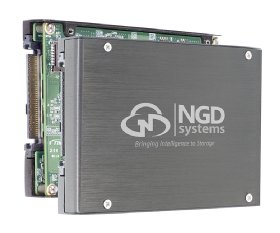
Computational storage devices, in many cases, look just like other SSDs. However, they may have more NAND flash memory to store data than regular SSDs. The use of multicore processors is unique to these devices as well. These processors are used for indexing data as it enters the storage device, searching contents for specific entries and providing support for sophisticated AI programs, among other functions.
With a computational storage architecture, data is processed at the storage device level, reducing the amount of data that must move between the storage and compute planes. Minimizing data movement makes real-time data analysis more efficient and reduces I/O bottlenecks, improving performance.
Computational storage to the rescue
The three key problems computational storage devices can address are the following:
Speed-of-light latency. The speed of light is not just a limit; it's the law. Latency increases in direct correlation with distance, regardless of bandwidth, is cumulative and has an oversized impact on response time. The only way to reduce speed-of-light latency -- until we develop wormhole subspace technology sometime in the distant future -- is to decrease the physical distance between the compute and the data being processed. In today's cloud-centric computing, this has become a major problem when the data and the application processing of that data are separated by considerable distances.
IoT applications are an area where distance between compute and data is a problem because devices are usually quite spread out. Other examples include healthcare remote monitoring and administering devices; smart cities with traffic cams, photo radar cameras and road sensors; and the TV and film industry, where petabytes of data are captured on location and shipped off-site for processing.
The distance problem is one computational storage can potentially solve. It enables the compute-, memory- and data-intensive processes to move closer to the stored data. In some cases, they move onto x86 or ARM processors connected to colocated NVMe SSD drives. In other cases, they move directly to an embedded ARM processor on an NVMe SSD controller. The application or application subset can then process or partially process the data right on the storage. The results are transported to the central cloud or core for further processing. The amount of processed data sent is nominal when compared to the original data set.
CPU performance bottleneck. The second problem computational storage can potentially solve is a storage system conundrum. Flash, NVMe and storage-class memory SSDs have become increasingly ubiquitous. Their IOPS, throughput and capacity, combined with rapidly declining prices, are truly remarkable. However, overall storage system performance has grown orders of magnitude slower than the sum total of the drives would imply. This is because of the CPU performance bottleneck, which can be attributed to increasing deceleration of Moore's law in regard to CPUs and the rapid proliferation of CPU-intensive storage processes, such as erasure coding, deduplication, compression, snapshot and encryption/decryption. These processes suck up enormous amounts of CPU and memory resources.
Computational storage could potentially this solve this problem, too. By offloading these CPU-intensive processes from the primary storage server or controller to the computational storage, it frees the primary CPU for more I/O and throughput performance.
Application performance issues. Just as storage processes can suck up CPU resources, so can some application processes. This is especially true with many kinds of database processes, AI, machine learning and deep machine learning. Shifting or offloading some of these processes to computational storage can have a huge and immediate positive impact on application performance.
The problem-solving potential of computational storage has drawn the attention of large vendors, small startups and standards bodies.
In the case of a database, it frees up the database server CPUs and memory to deliver more transactions, analytics and throughput in less time. For AI, it reduces the vast amount of data requiring analytics. In both cases, it accelerates the time to useful actionable information.
Who's behind computational storage
The problem-solving potential of computational storage has drawn the attention of large vendors, small startups and standards bodies. Some are developing computational storage devices or systems. Others are partnering with developers or are eager to integrate those devices and systems into their products. Vendors looking at using or developing computational storage include Alibaba, AT&T, ARM, AWS, Azure, Dell, Facebook, Google, Hewlett Packard Enterprise, Intel, Lenovo, Micron Technology, Microsoft, NetApp, Oracle, Quanta, Samsung, SK Hynix, Super Micro, Western Digital and Xilinx. Many of them are looking at computational storage to be the edge in fog, core or cloud computing.
Computational storage has also been the impetus for several startups, such as Burlywood, Eideticom, NGD Systems, Nyriad, ScaleFlux and others still in stealth mode. Standards body Storage Networking Industry Association has formed a working group to establish interoperability standards between computational storage devices. The OpenFog Consortium is also looking at computational storage standards.
NGD Systems' computational storage SSD
But where are the proof points? There are several. NGD claims it is working with two unnamed well-known server vendors, three white box vendors and a variety of hyperscalers. ScaleFlux has demonstrated significant performance improvements with several databases, including Aerospike, Apache HBase, Hadoop and MySQL. It has also demonstrated reduced CPU utilization and improved compression performance with OpenZFS Gzip. Eideticom has demonstrated higher-performance computational storage SSDs with IBM and Rackspace. And Pliops has shown much better performance for MySQL, Percona, MariaDB, RocksDB, InnoDB and others.
In the large product and cloud services vendor category, Oracle has been using computational storage for many years for its database system, Oracle Exadata Database Machine. Oracle offloads SQL, JSON, XML, encryption/decryption, its Recovery Manager backup filtering and fast data file creation from its database servers to its storage servers automatically. This has enabled Exadata to provide best-in-class database transactional IOPS and analytical throughput performance. That same performance powers Oracle's cloud database service.
The cost factor
Like most technologies with promise, there is also a downside. In this case, it's cost. How much computational storage will add will vary, based on CPU, dynamic RAM and NAND, but it will be more. However, that cost is likely to be offset by performance increases and the other previously discussed advantages of computational storage.
One final note: Computational storage devices aren't the only solution to the problems noted in this article. For instance, some vendors, such as StorOne, have written storage software to be orders of magnitude more efficient so it uses fewer CPU and memory resources. Others, such as Excelero, have created clever scale-out technologies that provide the same advantages as computational storage. But that's for another story.